Microsoft Purview Sensitivity Labels are all the rage these days; many organizations have already implemented them, or are in the process of doing so. Getting them right, however, is not guaranteed. And not getting it right from the beginning, can cause a headache down the road – reorganizing your labels or relabeling your data can be expensive and time-consuming.
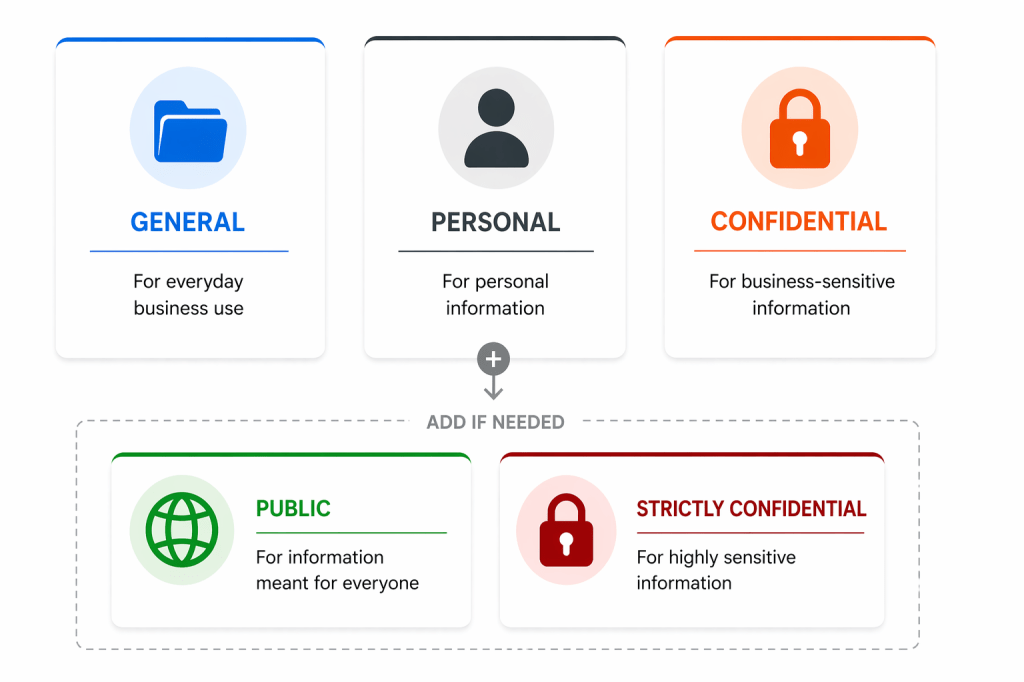
So how do you get it right from the beginning?
First of all, don’t leave it to IT alone. Getting your labels right is not an IT problem – it is one that involves several layers of the organization. Here are some questions you should ask yourself:
– Do we already have a system for classifying sensitive data? Can it be used, even partially?
Often it can, but it may very well be that it is too complicated, outdated or not user-friendly enough. If it is, it should not be used as-is, unless you have very good reasons to do so.
– What categories of sensitive data should we protect with labels?
Most organizations will want to protect different types of data, such as business-sensitive data, security-sensitive data and personal data.
The next question is, obviously: what labels for what type of data? And there are many other questions that should be addressed in the conceptual phase, such as: Where is my sensitive data located? In what situations is it most at risk? What is the right balance between restrictions and usability? How will we educate our end-users to bring them onboard? How can we increase our compliance by using labelling correctly? And what information should be restricted from AI?
Answering these questions is a team sport; every level of the organization needs to be involved.
Organizations often do not start out asking the conceptual questions; far too often, IT is left alone to implement labels that mirror the defaults from Microsoft, without any thought to how they should be shaped or used. Or they do involve others, and think it through, but overthink it.
The most obvious example, is when the Internal label is put on all e-mails and documents as a default, when in reality documents and e-mails are sent externally all the time. A more natural name for a default label would be General.
Your users do not care about choosing between different technical properties on the labels, they want simplicity.
The virtue of simplicity
Then there is the trap of creating too many labels (and sub-labels). The more complicated your structure is, the more opaque it will be to your end-users. Make sure all your labels are strictly necessary, and actually useful. Do you, for example, really need both Confidential and Strictly Confidential? If you are not sure, why not start with just Confidential? More can always be added later. If possible, try to stick with 3-5 labels maximum, and avoid sub-labels. Your users do not care about choosing between different technical properties on the labels, they want simplicity.
You also need to tackle the issue of purpose. Should you, for example, use the Confidential label for personal information? Probably not, as the term, in context, usually suggests business sensitive information.
And should you use sensitivity labelling at all to deal with personal information, or should you limit Purview to handling your business-sensitive information? And if you do, should Purview detect all personally identifiable information, or sensitive personal information only? For personal data, there is the data you treat about external clients, your employees and the personal data employees store on their devices that is theirs, and not business-related. It may not always be easy to differentiate between the three.
If you choose to use sensitivity labelling for personal information, I suggest you create a separate Personal label.
Also, should all users have access to a Public label, if it is rarely used and only used by, say, the marketing department? Remember, that label could be used to circumvent restrictions later, if users do not fully comprehend the labelling scheme or you implement too many restrictions.
Start with the basics
A good basic setup, is: General, Personal and Confidential. Add Public and Strictly Confidential if your organization requires it. Adding encryption and other restrictions on the labels should be done with care, and perhaps only for the more restrictive labels to begin with; as such, adding an extra Strictly Confidential or Restricted label can be useful.
Of course, each organization is different. For some organizations, with regulatory or internal requirements in certain industries, having many labels with different properties will make sense. But for most organizations, it is best to start out simple, with a well-thought through setup that has had all relevant stakeholders involved in shaping it.
After thorough consideration and piloting, appropriate labels and restrictions can be rolled out. If you have a good auto-labelling setup, complexity can be increased a bit. For a good run-through of some of the more sensible restrictions you may consider using with your labels, see this guide from Bearded 365 Guy.
How have you implemented your sensitivity labels? Please comment below.
 SoundSnw