This Easter I have been experimenting with improving a script I wrote a few years ago, using Claude Code. The script is a Jamf Self Service script that lets users automatically rename files that OneDrive for Mac is not syncing properly because of illegal characters.
I wanted to see if Claude could help:
1. Find bugs, improve and harden the script.
2. Convert it from bash to zsh, both in terms of compatibility and style.
3. Use possibilities in zsh to make it more efficient.
I am amazed at how quickly Claude helped me improve and modernize the script. Claude made a few errors, but it was surprisingly little compared to what other AI tools can sometimes do when I work with text. I also learned a lot about what works better in zsh compared to bash.
Perhaps there was no great need to modernize this script. After all, OneDrive started supporting syncing many previously illegal characters in 2025 and Microsoft also provides an option to automatically rename files that are still not allowed with the click of a button.
But the exercise shows that the cost of improving old code has now become so low that we may see a lot more of it, where old code would previously just linger. Improving the script to this level while also learning the intricacies of zsh would have taken me weeks without AI, whereas this took me just two days of playing around.
I was also able to prototype new ideas quickly. Some of them were incorporated in the new version (see all the shiny new configuration options) and some were not (such as automatically deleting the backup if integrity checks succeed and reinstating it if it they fail).
The new version (get it on GitHub):
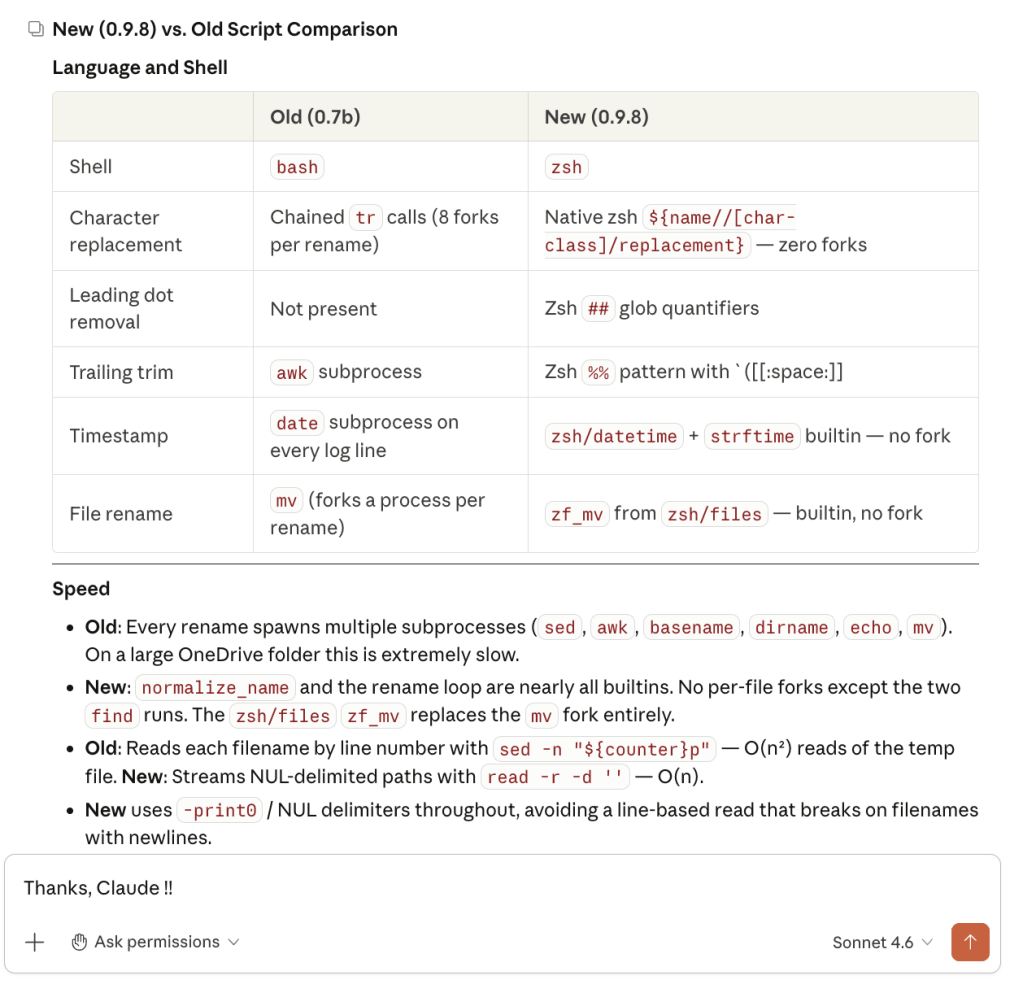
• Is substantially faster and more effective, doing fewer operations and using zsh builtins and modules to make it more efficient.
• Adds options at the top of the script for simpler and more granular configuration.
• Still fixes issues that prevent syncing, and covers more edge cases than before.
• Can omit fixing characters now supported by OneDrive
• Optionally lets users fix an extended set of characters that may be problematic when collaborating with Windows users.
Everyone who has been using my old script should consider migrating to the new version.
File names containing characters that are non-standard in SharePoint can, from what I gather, cause inconveniencies when collaborating with Windows users, even if OneDrive now allows Macs to sync more of these. For instance, illegal characters “display as HTML entities (e.g. * for *) on Windows.” Currently, this script is the only viable alternative on Mac if you want to let your users address that issue.
Yes, it is just a rename script. But a rather advanced one if you take a closer look. It identifies files that need treatment first, then rename them in one concentrated operation, treating child directories first, then parent directories and finally files. It has fallbacks for edge cases and collissions. The optional backup is done using Apple’s APFS clonefile so it only takes seconds, even on huge directories. It does an integrity check before and after renaming, and creates human-readable logs that IT can check in case something goes wrong. The files it creates for internal operation have random names, using mktemp for safety. And it cleans up after itself and restarts OneDrive if aborted irregularly. It is optimized and battle hardened. Renaming files in live user environments, after all, can potentially break things.
Using OpenAI Codex to make a user-facing application
Want to become familiar with a new language? Why not start by asking AI to convert a program you already know.
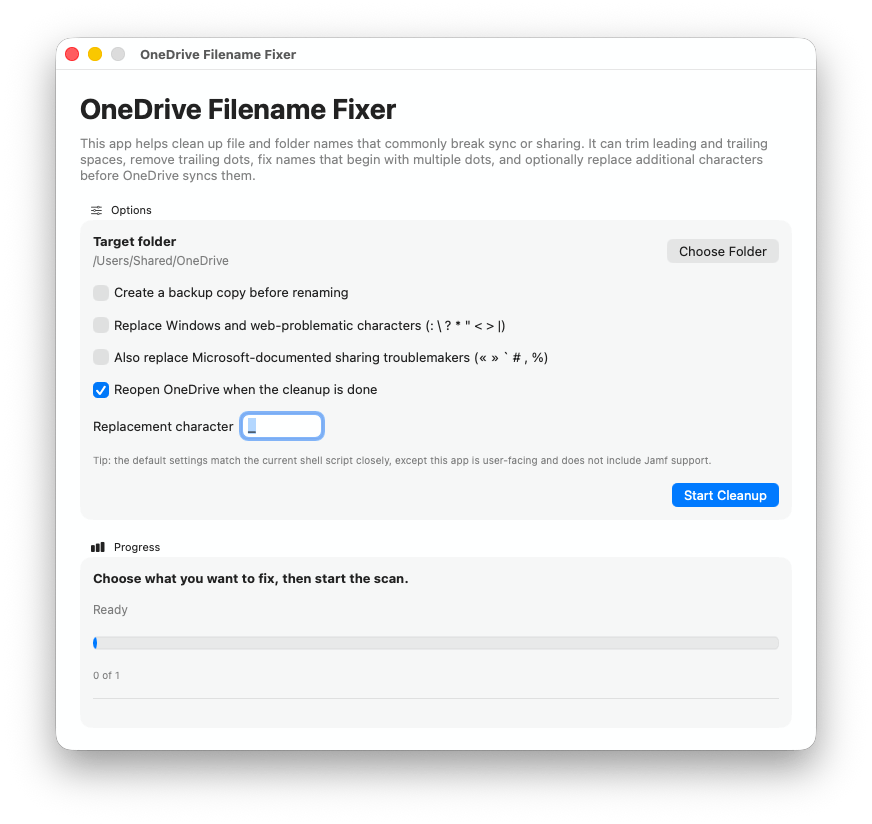
Just for fun, I asked OpenAI Codex to convert the script into a user-friendly Mac application and add a progress bar, using Swift, a language I am not familiar with. It did the conversion in just 11 minutes. The application is, unlike the script, not production ready and I have not had the time to test it properly. However, this demonstrates just how endless the possibilities of AI assisted coding are in terms of innovation, code improvement and learning.
My prediction is that in coming years, we will experience huge efficiency improvements as old code is being optimized, making systems faster and leaner. Innovation will also get an incredible boost. At the same time, the lower threshold for launching new ideas may paradoxically lead to more bloat.
This blog post was produced with human intelligence (except for the easter bunny).
 SoundSnw